Congrats on joining our ecosystem of profit making sellers 😊
Note: You must have any active baapstore plan to place orders with us. Got an active plan with us? If you are still
Step 1: Login
Log in to shop.baapstore.com using the your registered email address and enter the OTP sent to your mail
Step 2: Search for a Sold Product
- Click on the Search icon and enter the SKU number
- Click on the product to go the particular product page.
Step 3: Add to Cart
Select the required product options and click Add to Cart.
Step 4: Fill Mandatory Order Information
On the Cart page, enter these fields mandatorily.
- Reseller Name (this name only will be printed on the courier cover under the 'From' name.
- Customer Price (this is the price your customer paid you, enter the same price as you sold to them)
-
Is this a COD Order? (if you select Yes, we will collect payment from your customer and deposit to your bank account or store credit. If you select No, we assume it as a prepaid order and will NOT collect payments from your customers)
Then click Checkout.
Step 5: Enter Shipping Address
Enter the Shipping Address of your customer.
Note: If you have already placed order, you need to click on 'v' and ensure correct address is prefilled or enter the new shipping address.
Step 6: Enter Billing Address
Enter your own address in the Billing Address section.
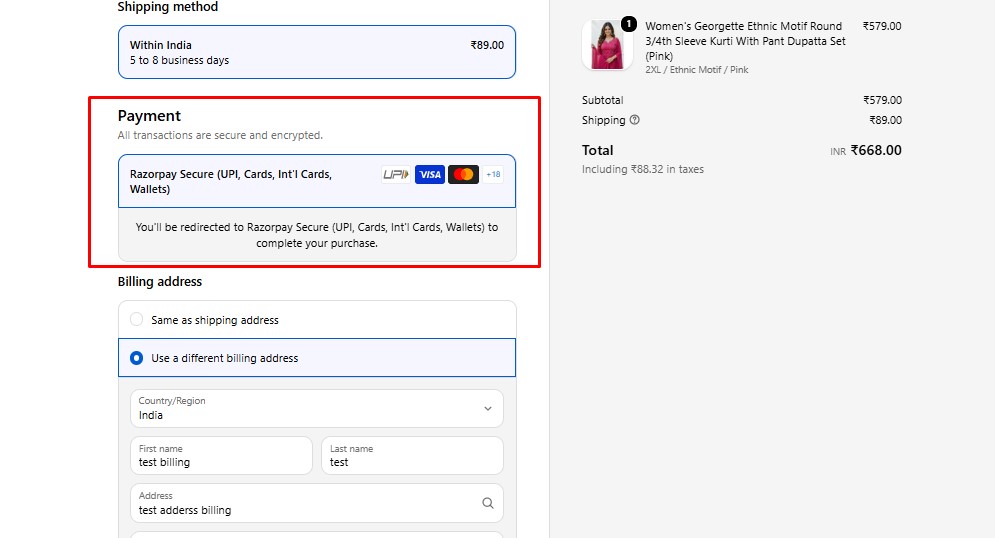
Step 7: Select Payment Method
Choose one of the following payment options:
-
Razorpay (Online Payment)
-
Store Credit (If you have topped up already and balance is available)
Step 8: Complete Order
-
If using Razorpay, click Pay Now and complete the payment.
-
If using Store Credit, click Complete Order to place the order successfully.